
aka Hansel & Gretel et le Château Enchanté · João e Maria e o Castelo Encantado
Before you can save Gretel from the witch's oven in Hansel & Gretel And the Enchanted Castle, you have to click on every single prop on screen while hoping you do not trigger a trap door.
You start in a fairy tale cottage that looks like a storybook page, but you have no inventory screen, no conversation trees, and no direct movement controls. To reach Gretel before she becomes dinner, Hansel must track down Prin, a mischievous forest imp who hides inside background objects. Every few scenes, finding Prin grants you the key to the kitchen, which is the only way to advance the rescue mission.
The screen functions as an interactive search grid. You left-click or right-click on furniture, picture frames, and hidden levers to reveal secret passages or trigger animated routines. If you hit the wrong hotspot, the Wicked Witch swoops in, drags Hansel away, and locks him back in a cell. That sudden penalty forces you to tread carefully across every background frame.
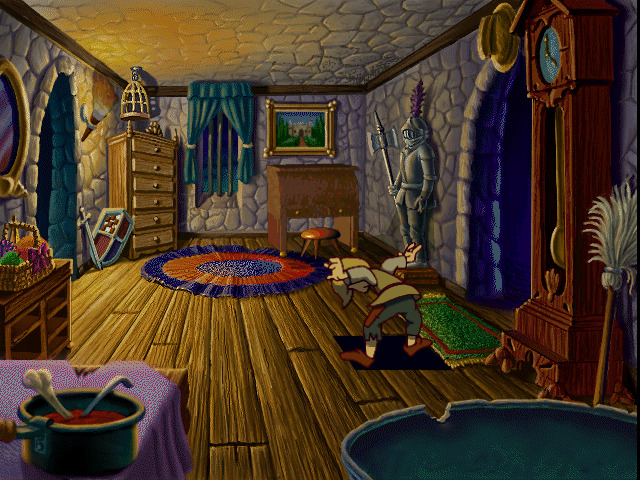
Unlike standard titles in the adventure game genre, this release strips away traditional item management entirely. You never carry a rope, a key, or a spellbook in a pouch at the bottom of the screen. Key progression items, such as a shrinking potion or a magic wand, take effect the moment you discover them on a backboard.
This design shifts the focus heavily onto visual observation and systematic clicking. Retrospective players often describe the gameplay as a total clickathon, where success comes down to testing every pixel. While that approach removes inventory clutter, it also means a bad guess can end your run unexpectedly.
The spatial layout of the castle relies on hidden doors and sudden traps rather than standard room-by-room navigation. Opening a cupboard might reveal a passage to the upper floor, or it might trigger an animation that alerts the witch. Because there is no map or visual indicator for safe objects, you must memorize room layouts through trial and error.
TerraGlyph Interactive Studios, L.P., based out of Schaumburg, Illinois, designed the title with a distinct learning concept at its core. Studio founder Donald F. Flynn oversaw an educational framework that supports five full languages: English, Spanish, French, German, and Japanese. Players can set spoken audio to one language while setting screen labels and object names to another.
That mix-and-match approach lets a player hear dialogue in French while reading item vocabulary in German or English. It gives the title a genuinely unique position among mid-nineties educational releases. The animated presentation ran on Windows systems using Microsoft WinG graphics technology, alongside a native 1995 release built as a standalone Hansel & Gretel And the Enchanted Castle MS-DOS game.
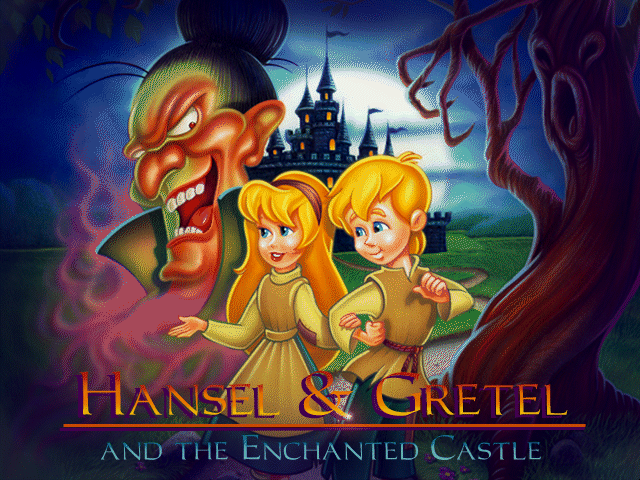
Replay value comes from an aggressive shuffle system. Every time you launch a fresh game, critical items, trap doors, and imp locations change places completely. The magic wand you found inside a grandfather clock during your first run might sit behind a painting on your second try.
The game offers two difficulty settings, Easy and Hard, which adjust the puzzle logic and shuffle frequencies. On higher settings, navigating the maze-like floor plan requires re-testing dynamic trigger locations without any safe patterns to rely on. That randomness frustrates players looking for a straight narrative walk, but it ensures no two sessions play out identically.
The difficulty split changes how aggressively the witch responds to incorrect inputs. On Easy mode, misclicking an interactive prop might only play a short distracting animation. On Hard mode, the same misclick brings the witch immediately, resetting your progress and forcing you back to the dungeon cells.
If you want to test your luck against the witch, you can play Hansel & Gretel And the Enchanted Castle online without searching for old CD-ROMs or dealing with system compatibility prompts. Everything runs Hansel & Gretel And the Enchanted Castle free in your browser right here, letting you jump straight into the storybook screen-searching without any technical setup.
Select your difficulty level, choose your language pairing, and track down Prin before the witch catches Hansel in the hallway. It is a curious mix of mid-nineties animation and language practice that rewards careful clicking and patient observation.
Before you can save Gretel from the witch's oven in Hansel & Gretel And the Enchanted Castle, you have to click on every single prop on screen while hoping you do not trigger a trap door.
You start in a fairy tale cottage that looks like a storybook page, but you have no inventory screen, no conversation trees, and no direct movement controls. To reach Gretel before she becomes dinner, Hansel must track down Prin, a mischievous forest imp who hides inside background objects. Every few scenes, finding Prin grants you the key to the kitchen, which is the only way to advance the rescue mission.
The screen functions as an interactive search grid. You left-click or right-click on furniture, picture frames, and hidden levers to reveal secret passages or trigger animated routines. If you hit the wrong hotspot, the Wicked Witch swoops in, drags Hansel away, and locks him back in a cell. That sudden penalty forces you to tread carefully across every background frame.

Unlike standard titles in the adventure game genre, this release strips away traditional item management entirely. You never carry a rope, a key, or a spellbook in a pouch at the bottom of the screen. Key progression items, such as a shrinking potion or a magic wand, take effect the moment you discover them on a backboard.
This design shifts the focus heavily onto visual observation and systematic clicking. Retrospective players often describe the gameplay as a total clickathon, where success comes down to testing every pixel. While that approach removes inventory clutter, it also means a bad guess can end your run unexpectedly.
The spatial layout of the castle relies on hidden doors and sudden traps rather than standard room-by-room navigation. Opening a cupboard might reveal a passage to the upper floor, or it might trigger an animation that alerts the witch. Because there is no map or visual indicator for safe objects, you must memorize room layouts through trial and error.
TerraGlyph Interactive Studios, L.P., based out of Schaumburg, Illinois, designed the title with a distinct learning concept at its core. Studio founder Donald F. Flynn oversaw an educational framework that supports five full languages: English, Spanish, French, German, and Japanese. Players can set spoken audio to one language while setting screen labels and object names to another.
That mix-and-match approach lets a player hear dialogue in French while reading item vocabulary in German or English. It gives the title a genuinely unique position among mid-nineties educational releases. The animated presentation ran on Windows systems using Microsoft WinG graphics technology, alongside a native 1995 release built as a standalone Hansel & Gretel And the Enchanted Castle MS-DOS game.

Replay value comes from an aggressive shuffle system. Every time you launch a fresh game, critical items, trap doors, and imp locations change places completely. The magic wand you found inside a grandfather clock during your first run might sit behind a painting on your second try.
The game offers two difficulty settings, Easy and Hard, which adjust the puzzle logic and shuffle frequencies. On higher settings, navigating the maze-like floor plan requires re-testing dynamic trigger locations without any safe patterns to rely on. That randomness frustrates players looking for a straight narrative walk, but it ensures no two sessions play out identically.
The difficulty split changes how aggressively the witch responds to incorrect inputs. On Easy mode, misclicking an interactive prop might only play a short distracting animation. On Hard mode, the same misclick brings the witch immediately, resetting your progress and forcing you back to the dungeon cells.
If you want to test your luck against the witch, you can play Hansel & Gretel And the Enchanted Castle online without searching for old CD-ROMs or dealing with system compatibility prompts. Everything runs Hansel & Gretel And the Enchanted Castle free in your browser right here, letting you jump straight into the storybook screen-searching without any technical setup.
Select your difficulty level, choose your language pairing, and track down Prin before the witch catches Hansel in the hallway. It is a curious mix of mid-nineties animation and language practice that rewards careful clicking and patient observation.
How Hansel & Gretel And the Enchanted Castle is played — the keys the game listens to, grouped by what they do.
Highlighted keys are mapped — hover or tap one to see what it does.
Access the main menu by moving the cursor to the lower left part of the screen.
The on-screen keyboard and gamepad mapping the browser player uses on a phone, a tablet or a controller, as opposed to the real keys above. $PRO members make their own in the player and share them here; anyone can pick one to play with.
Cheat codes, console commands and memory pokes for Hansel & Gretel And the Enchanted Castle — each one verified and attributed.
Sign in to submitHow Hansel & Gretel And the Enchanted Castle is played — the keys the game listens to, grouped by what they do.
Highlighted keys are mapped — hover or tap one to see what it does.
Access the main menu by moving the cursor to the lower left part of the screen.
The on-screen keyboard and gamepad mapping the browser player uses on a phone, a tablet or a controller, as opposed to the real keys above. $PRO members make their own in the player and share them here; anyone can pick one to play with.
Cheat codes, console commands and memory pokes for Hansel & Gretel And the Enchanted Castle — each one verified and attributed.
Sign in to submit