
Firing up Virtual Chess Platinum puts you straight in front of a dual-screen presentation where a classic flat overhead board sits side-by-side with a fully rotatable 3D wooden set.
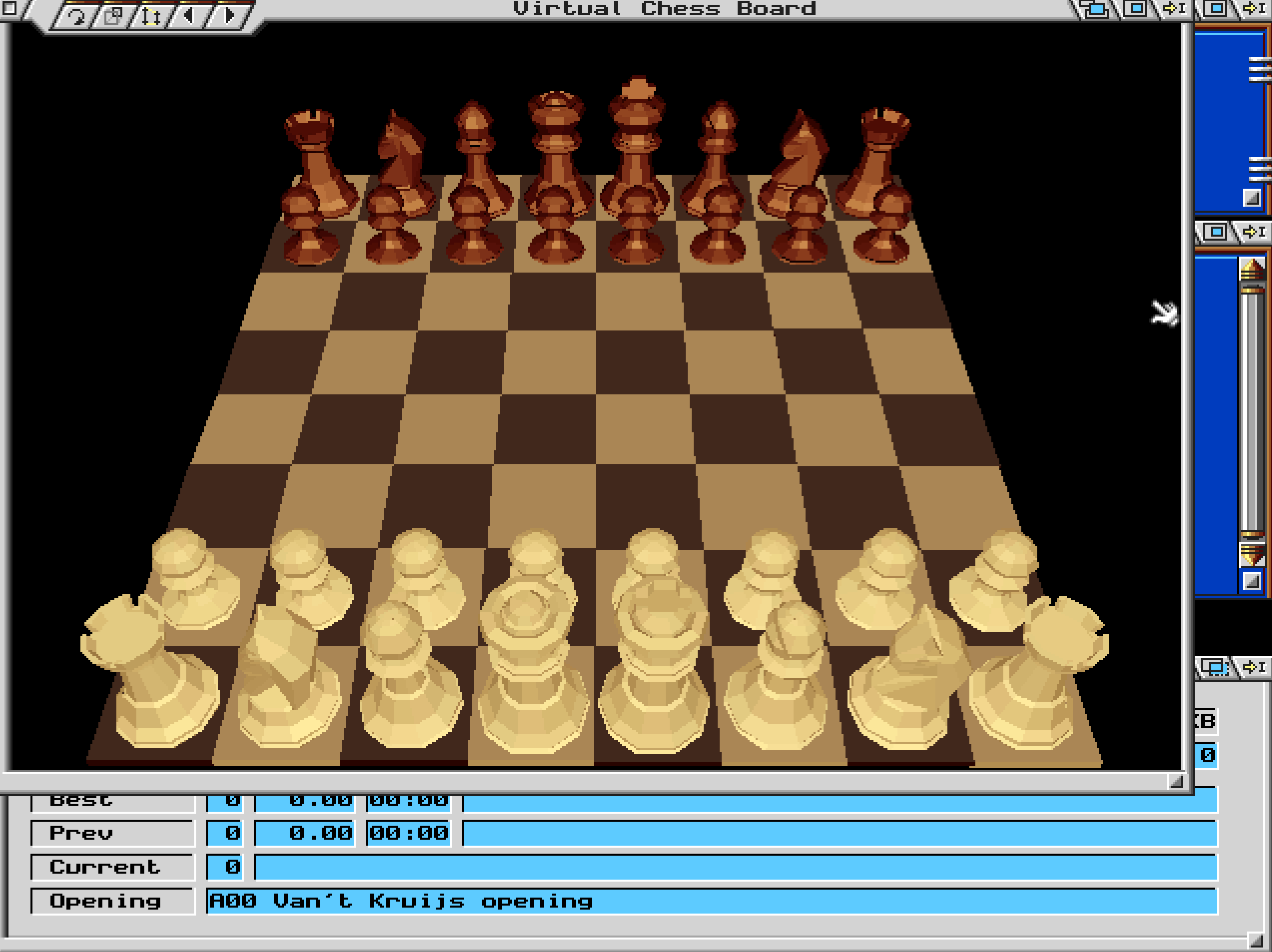
When you boot into the match interface, the display splits down the middle. On the left side, a crisp 2D overhead map gives you an instant, uncluttered overview of piece positions, control lines, and open files. On the right, a 3D board renders complete with shaded polygons and basic lighting that attempt to emulate the look of polished physical pieces on a standard tournament table.
You can click directly on the 3D board, grab the scene with your mouse cursor, and tilt or spin the entire board to whatever angle feels comfortable. If an opponent's knight hides behind a tall queen or a thick rook tower, a quick drag of the mouse spins the camera around to reveal the line of sight. Most players who spent long nights sitting in front of a CRT monitor ended up doing their actual strategic planning on the flat 2D side, using the rotatable 3D display purely to appreciate the visual flare of a sharp move.
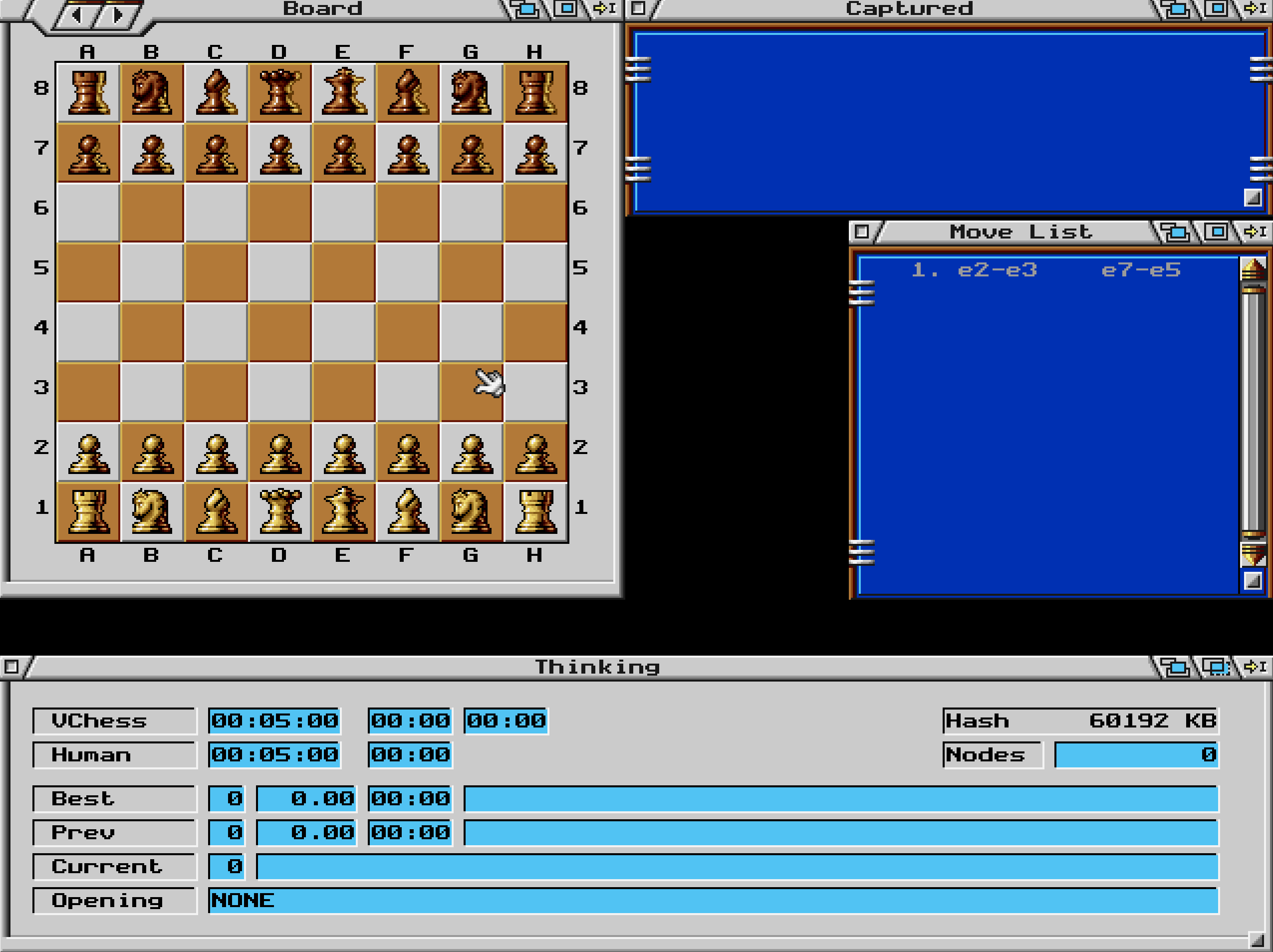
That visual choice was a deliberate design trade-off for software targeting standard mid-nineties home PCs. Rendering computer chess in full perspective required actual hardware cycles, and software developers at Titus France knew that players wanted high-speed engine calculation above all else. Offering both screens simultaneously meant you never had to sacrifice clear tactical reads for cosmetic presentation.
Beyond the raw board geometry, the disk contents include full motion video sequences designed to give the match a theatrical feel. An animated opening sequence plays when the game loads, setting up a dark, moody backdrop for the computer confrontation. Certain key events on the board also trigger short digitized video clips, offering dramatic cutscenes when high-value pieces meet their doom.
Underneath the video flair sits an aggressive chess engine. Released when home computers were making rapid strides in calculation speed, this edition of the 1995 release targeted players who wanted a serious sparring partner at home. The engine evaluates thousands of candidate positions per second, grinding down careless pawn structures and punishing open king setups with cold efficiency.
Published by Titus Software Corporation, the program included scalable difficulty settings to cater to different skill levels. You can constrain the engine's search depth or force it to respond within strict time controls. Playing against the CPU on its highest search settings meant leaving your PC running while the fan hummed away in the background, carefully chewing through mid-game possibilities before registering a move.
The split interface is practical, but it carries a few distinct visual quirks that can catch you off guard during blitz play. Because the 3D board relies on early software lighting, piece contrast can get muddy if you rotate the perspective directly into the light source. Dark square bishops sometimes merge with dark board tiles when viewed from low angles, leading to accidental misclicks if you rely solely on the 3D screen.
Navigating the drop-down menus can feel slightly stiff compared to modern windowing environments. Changing time controls, resetting move histories, or toggling evaluation readouts requires clicking through modal dialog boxes that pause the engine completely. Here is a list of interface steps to keep in mind when setting up a custom scenario:
Despite those interface hiccups, the underlying mathematical framework delivers strong play. The system rarely makes straightforward tactical blunders on medium or high difficulty levels. If you leave a bishop undefended on square c4, the software recognizes the free material instantly and capitalizes without hesitation.
A typical session in this strategy / tactics title begins with choosing your color and selecting an opening system. If you play white, pushing your king pawn to e4 triggers an immediate processing cycle from the engine. The engine responds within seconds on early turns, drawing from a pre-calculated opening library to establish quick center control.
As the board clears and positional complexities grow, board management becomes critical. Keeping your focus locked on the 2D grid prevents tactical oversight while using the 3D window as a visual reference point for board presence. The engine excels at exploiting overextended pawns, so maintaining a compact defense is often the best route through the mid-game slump.
Endgame play shows off the engine's speed. Once pieces are traded down to rooks and pawns, the software calculates forced mate sequences rapidly. Watching the computer execute a clean ladder mate with two rooks provides a clear demonstration of how it locks down positional logic.
If you want to test your tactical skills against a classic mid-nineties engine, you can play Virtual Chess Platinum free in your browser right now. You get the complete original release running straight in your window with no files to download or setup screens to navigate.
Running the Virtual Chess Platinum MS-DOS game directly in your browser lets you experience the precise snap of the dual-screen system and hear the original sound cues during move execution. The snappy rotation of the 3D board and the instant feedback of the 2D layout remain completely intact for your next match.
Firing up Virtual Chess Platinum puts you straight in front of a dual-screen presentation where a classic flat overhead board sits side-by-side with a fully rotatable 3D wooden set.
When you boot into the match interface, the display splits down the middle. On the left side, a crisp 2D overhead map gives you an instant, uncluttered overview of piece positions, control lines, and open files. On the right, a 3D board renders complete with shaded polygons and basic lighting that attempt to emulate the look of polished physical pieces on a standard tournament table.
You can click directly on the 3D board, grab the scene with your mouse cursor, and tilt or spin the entire board to whatever angle feels comfortable. If an opponent's knight hides behind a tall queen or a thick rook tower, a quick drag of the mouse spins the camera around to reveal the line of sight. Most players who spent long nights sitting in front of a CRT monitor ended up doing their actual strategic planning on the flat 2D side, using the rotatable 3D display purely to appreciate the visual flare of a sharp move.

That visual choice was a deliberate design trade-off for software targeting standard mid-nineties home PCs. Rendering computer chess in full perspective required actual hardware cycles, and software developers at Titus France knew that players wanted high-speed engine calculation above all else. Offering both screens simultaneously meant you never had to sacrifice clear tactical reads for cosmetic presentation.
Beyond the raw board geometry, the disk contents include full motion video sequences designed to give the match a theatrical feel. An animated opening sequence plays when the game loads, setting up a dark, moody backdrop for the computer confrontation. Certain key events on the board also trigger short digitized video clips, offering dramatic cutscenes when high-value pieces meet their doom.
Underneath the video flair sits an aggressive chess engine. Released when home computers were making rapid strides in calculation speed, this edition of the 1995 release targeted players who wanted a serious sparring partner at home. The engine evaluates thousands of candidate positions per second, grinding down careless pawn structures and punishing open king setups with cold efficiency.

Published by Titus Software Corporation, the program included scalable difficulty settings to cater to different skill levels. You can constrain the engine's search depth or force it to respond within strict time controls. Playing against the CPU on its highest search settings meant leaving your PC running while the fan hummed away in the background, carefully chewing through mid-game possibilities before registering a move.
The split interface is practical, but it carries a few distinct visual quirks that can catch you off guard during blitz play. Because the 3D board relies on early software lighting, piece contrast can get muddy if you rotate the perspective directly into the light source. Dark square bishops sometimes merge with dark board tiles when viewed from low angles, leading to accidental misclicks if you rely solely on the 3D screen.
Navigating the drop-down menus can feel slightly stiff compared to modern windowing environments. Changing time controls, resetting move histories, or toggling evaluation readouts requires clicking through modal dialog boxes that pause the engine completely. Here is a list of interface steps to keep in mind when setting up a custom scenario:
Despite those interface hiccups, the underlying mathematical framework delivers strong play. The system rarely makes straightforward tactical blunders on medium or high difficulty levels. If you leave a bishop undefended on square c4, the software recognizes the free material instantly and capitalizes without hesitation.
A typical session in this strategy / tactics title begins with choosing your color and selecting an opening system. If you play white, pushing your king pawn to e4 triggers an immediate processing cycle from the engine. The engine responds within seconds on early turns, drawing from a pre-calculated opening library to establish quick center control.

As the board clears and positional complexities grow, board management becomes critical. Keeping your focus locked on the 2D grid prevents tactical oversight while using the 3D window as a visual reference point for board presence. The engine excels at exploiting overextended pawns, so maintaining a compact defense is often the best route through the mid-game slump.
Endgame play shows off the engine's speed. Once pieces are traded down to rooks and pawns, the software calculates forced mate sequences rapidly. Watching the computer execute a clean ladder mate with two rooks provides a clear demonstration of how it locks down positional logic.
If you want to test your tactical skills against a classic mid-nineties engine, you can play Virtual Chess Platinum free in your browser right now. You get the complete original release running straight in your window with no files to download or setup screens to navigate.
Running the Virtual Chess Platinum MS-DOS game directly in your browser lets you experience the precise snap of the dual-screen system and hear the original sound cues during move execution. The snappy rotation of the 3D board and the instant feedback of the 2D layout remain completely intact for your next match.
How Virtual Chess Platinum is played — the keys the game listens to, grouped by what they do.
Highlighted keys are mapped — hover or tap one to see what it does.
Primary control is via the mouse interface; board rotation and navigation are handled with the mouse buttons.
The on-screen keyboard and gamepad mapping the browser player uses on a phone, a tablet or a controller, as opposed to the real keys above. $PRO members make their own in the player and share them here; anyone can pick one to play with.
Cheat codes, console commands and memory pokes for Virtual Chess Platinum — each one verified and attributed.
Sign in to submitaka Virtua Chess · Virtual Chess
How Virtual Chess Platinum is played — the keys the game listens to, grouped by what they do.
Highlighted keys are mapped — hover or tap one to see what it does.
Primary control is via the mouse interface; board rotation and navigation are handled with the mouse buttons.
The on-screen keyboard and gamepad mapping the browser player uses on a phone, a tablet or a controller, as opposed to the real keys above. $PRO members make their own in the player and share them here; anyone can pick one to play with.
Cheat codes, console commands and memory pokes for Virtual Chess Platinum — each one verified and attributed.
Sign in to submit