Zelda Classic
aka Zelda DX
Rate this game
- Played
- All the time
Before custom game engines were easy to come by, Zelda Classic started as a fan project to rebuild Nintendo's 1986 action game pixel-for-pixel on the PC.
An exact MS-DOS recreation that grew into something much bigger
Most fan projects from the late nineties died before completing a single playable screen, but Zelda Classic actually delivered. Started by programmer Phantom Menace in 1999 under the banner of Armageddon Games, the project set out to replicate the original NES The Legend of Zelda on PC displays. By mid-2000, version 1.84 achieved a screen-for-screen copy of Hyrule, matching every monster challenge, dungeon layout, and item drop of the console game. It gave PC players an exact replica of Link's journey to gather the shards of the Triforce of Wisdom and defeat Ganon without needing a console.
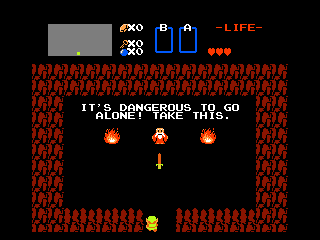
Drop into the initial screen of the 2000 adventure and the familiar design grabs you immediately. You start in the top-down view with nothing but a basic sword, face three open screens, and have to figure out which cave holds your initial weapon upgrade. The mechanics mirror the original down to the details: your sword beam fires only when Link is at full health, bombs crack open secret walls, and the candle burns away specific bushes to expose hidden stairs. If you were playing the 2000 release on a low-end MS-DOS machine back then, sound effects chugged through your Sound Blaster with surprising fidelity to the NES synth chip.
Where the original game spikes its difficulty
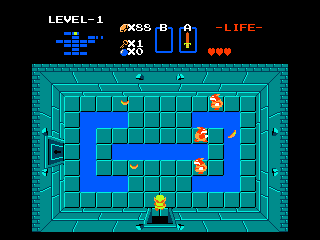
Because it follows the 1986 layout so faithfully, it inherits every brutal design choice from the original cartridge. The game never tells you which bush to burn or which wall to blast with a bomb. If you do not burn every single tree in a screen, you will miss vital heart containers and shop upgrades. Mid-game dungeons present immediate difficulty walls where dark rooms force you to dodge fast-moving Darknuts while juggling candles and shields, offering zero forgiveness if your health is low.
The original hardware constraints also mean that getting cornered by high-damage enemies leads to instant deaths, resetting you back to the start of the level with only three hearts. Early DOS builds running under mobile emulators or unoptimized environments suffered performance hitches and occasional crashes during heavy screen transitions, amplifying the frustration of a bad dungeon run. It was a merciless experience by modern standards, but completely faithful to what made the original game so tense.
How ZQuest turned a clone into a complete engine
The real turning point for the project came when the team bundled the program with ZQuest, a full level editor. Suddenly, players were not just running through Hyrule again; they were drawing custom overworld maps, placing items, importing custom graphics, and defining secret flags. The release of version 1.90 on mirror sites like Download.com caused an explosion in popularity, bringing over a million downloads and flooding Armageddon Games with thousands of new community creators.
Over the years, lead developer Dark Nation and later maintainers pushed the codebase far beyond basic NES emulation. The engine eventually added support for 8-direction character movement, side-scrolling gravity areas reminiscent of Zelda II, drowning mechanics in deep water, and sword-slashing animations pulled from Link's Awakening. Through custom scripting via ZScript, creators began crafting custom cutscenes, complex trading sequences, and interactive town NPCs, transforming a simple clone into a flexible engine for entirely original games.
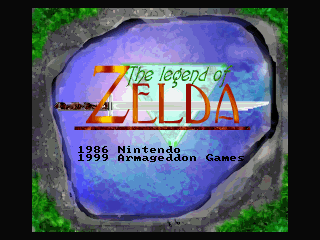
Why you should play Zelda Classic online today
It is easy to forget how impressive a fan recreation like this was at the turn of the millennium. Before official digital storefronts brought early console games back to computer monitors, playing this MS-DOS game was the premier way to experience Hyrule on a monitor. The community's dedication even earned the project the Golden Deku Nut award at the 2009 Exploding Deku Nut Golden Item Awards, solidifying its place in fan-dev history.
The pure simplicity of the combat and the joy of finding a hidden cave still hit the mark. While the lack of direction and endless backtracking might test your patience, the tight top-down controls feel sharp to master. You can play Zelda Classic free in your browser right now with zero setup, making it easy to jump straight into Hyrule and see how one fan project kept going for decades.
How Zelda Classic is played — the keys the game listens to, grouped by what they do.
- Movement
- Action
- Interface
Highlighted keys are mapped — hover or tap one to see what it does.
Key bindings can be remapped from the main/in-game menu via Settings -> Controls.
Players' controls
Touch and gamepad controls
The on-screen keyboard and gamepad mapping the browser player uses on a phone, a tablet or a controller, as opposed to the real keys above. $PRO members make their own in the player and share them here; anyone can pick one to play with.
Make your own touch controlsPRO
- 1Open the editorSign in below, then pick what to make. The game starts with the editor open over it.
- 2Place your keysAdd keys and drag them where your thumbs rest, or map a controller's buttons. Test plays the game with them; Save keeps them, and you play with them from then on.
- 3Share themShare them right after saving in the game, or name and share them here. Players vote, and the best become this game's controls for everyone.
Go PROSee how it worksSign in+20 XP for sharing · +50 XP if yours become the game's own
- The game's own controlsKeyboardGamepadWhat every player starts with.In use
3 screenshots
From the archive
No gameplay video yet
No gameplay video for Zelda Classic yet. Sign in to add one.
No reviews yet
Tell the community what you think of Zelda Classic. Reviews are public and tied to your username.
No archived manuals for Zelda Classic yet
No manuals archived for this title yet. Sign in to upload the first scan.
Cheat codes, console commands and memory pokes for Zelda Classic — each one verified and attributed.
Sign in to submitNo cheats yet for this title
Know a working cheat, poke or trainer? Add it with the button above. Moderators check every entry before it goes live.
No archived soundtrack for Zelda Classic yet
No soundtrack archived for this title yet. Sign in to upload the first rip.
No save states for Zelda Classic yet
No save states for this title yet. Sign in to share one.
Discussions
Sign in to post- Threads0
- Total posts0
- Online now6
Community · Zelda Classic
Who's contributing, and what's new
- Reviews0
- Threads0
- Uploadsapproved0
- Contributors0
Recent activity
Nothing here yet
Reviews, discussion threads and approved uploads appear here as members add them.